← All courses

MiniMe: your Local AI Agent!
Course · Agents and automation · Level 3
Build your own AI assistant that works on your files and keeps your context, without writing code.
Why every chat starts over, and what changes with an assistant that works on your files, with your memory and your tone. Spoken in Italian, with English subtitles.
A workspace running Claude Code, with a CLAUDE.md that holds who you are and how you communicate.
A skill you build yourself, from scratch, and install: meeting minutes, or whatever you repeat most.
Two specialized agents splitting a real piece of your work between them.
Your first MCP connection, reaching past your own machine, with the safety rules that keep it in bounds.
Each part, in order, leaves you something installed and working.
Why a chat that forgets costs you time, and what changes when the AI keeps your context. You meet Alex, a sales manager, and the work they do every week.
Describing the outcome you want instead of the next step. The approach that turns a conversation into a task you can hand over.
Claude Code, installed and open for the first time. The terminal, explained to someone who has never used one.
The same assistant inside Visual Studio Code, in a window with buttons instead of commands.
Real work to try it on: an email, a report, a file to go through. Small exercises, one after another.
Your own skill, built from scratch and installed. From here the assistant does what you taught it, by name.
Two agents, each with a job, working on the same task. How to split work that is too big for one.
The assistant connected to a folder or an outside service with MCP, and the boundary you set around it.
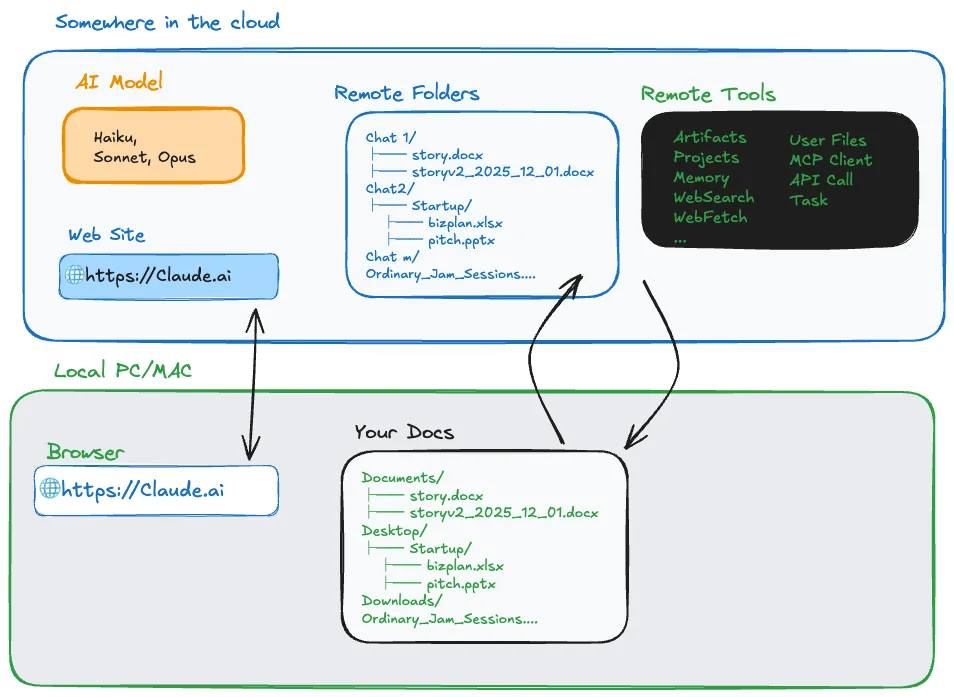
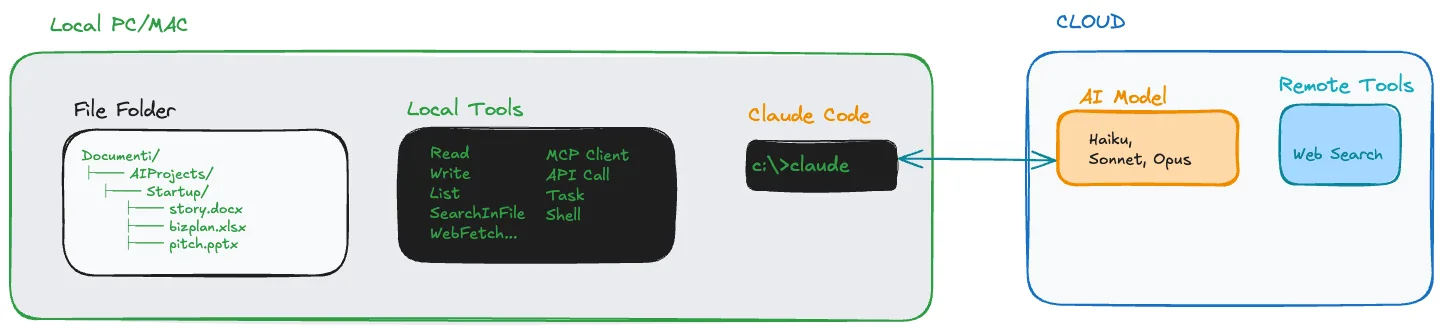
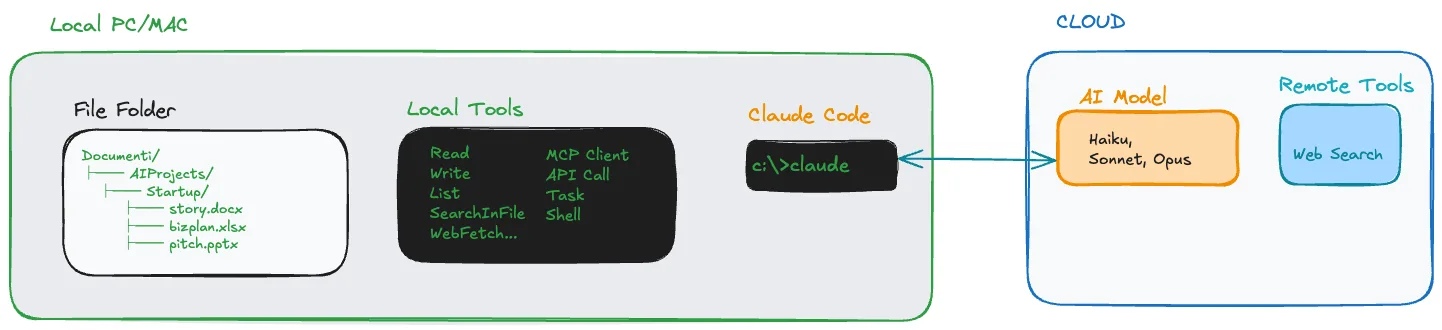
The two diagrams come from the first lesson, where they compare the two approaches.
A file, a configuration or a skill that stays on your computer and works after you close the lesson.
Alex, a sales manager, with the same weekly work timed before and after: a client email from five minutes to two.
Stuck? Ask, in writing or out loud. It answers about the lesson you are on.
5 questions per lesson. At the end you get a course certificate, with the quizzes you passed.
You get good answers, but every conversation starts over and nothing you built stays.
Documents, spreadsheets, reports you redo every week. That is where an assistant helps most.
A Mac or a Windows machine you can install software on, a Claude subscription with Claude Code, and the basics of how generative AI works. Nothing else.
DigComp is the list Europe uses to name digital skills. There are 21 in all: this course covers 9. Below you find which ones, and in which lesson you learn them.
For several people, team licences cost less per person.
If after 10 minutes you have not learned something new, you have lost 10 minutes.
No. You will use a terminal and an editor, but you write instructions in your own language. The course assumes you have never opened either.
A few hours of reading, more with the practice: installing, building a skill, connecting MCP.
Yes, on both Mac and Windows. The setup lesson covers each one.
You decide. The assistant runs on your machine and reads the folders you point it to, and Part 8 is where you draw that boundary.

Max Turazzini. 3 years of workshops in more than 200 companies, 2,000 people trained. The assistant was built for everyday work first, then taught in rooms where people said it would never work for them.
"You learn AI by doing it, by getting it wrong, and by having someone beside you who has been there before."
Start with the free lesson →