← All courses

Vibe Coding for Non-Programmers
Course · Development and coding · Level 2
You describe what you need and the AI builds it. From the first sentence in a chat to an app online with your own data inside.
A dashboard built inside a chat, reading your own CSV and showing totals, filters and charts
An app published at a real web address, with a database that remembers what you put in it
A six-step method that works for any idea, from the problem to testing it with colleagues
The habit of reading the code the AI wrote, changing one thing on purpose and understanding an error instead of generating again at random
A prototype the IT team can use as a brief, so you get an answer
The app you put online grows out of the sentence you learn to write in the first lesson.
One sentence in your own language, and a working program appears on screen. Here you also learn why the AI invents something new every time while code does not.
A vague request becomes a prompt that returns what you wanted, and what you built comes out of the chat with you.
Feed it a CSV and get a dashboard with filters and charts. The second half builds an app that fetches real data from outside.
Now you leave the chat and publish. The app gets a web address and a database that remembers.
When it breaks, the symptoms tell you which problem it is, and you know what to write to get it fixed and when to stop.
Open the code, read what it does, change one small thing with your own hands without breaking the rest.
The six steps that carry over to any idea, with the templates to fill in while you work.
Present the prototype to people who write software for a living: what holds, what does not, and the answer you get back.
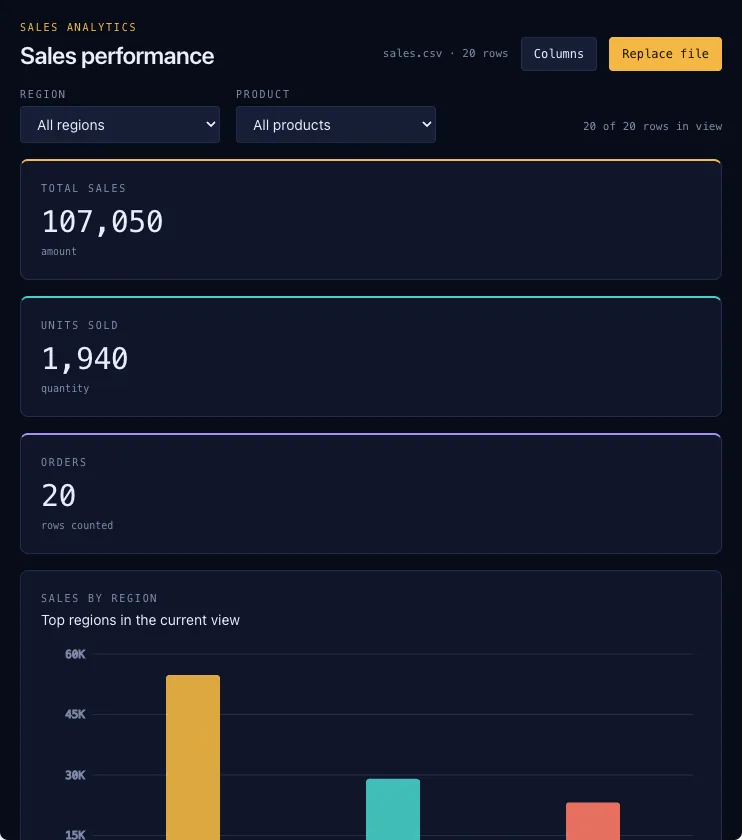
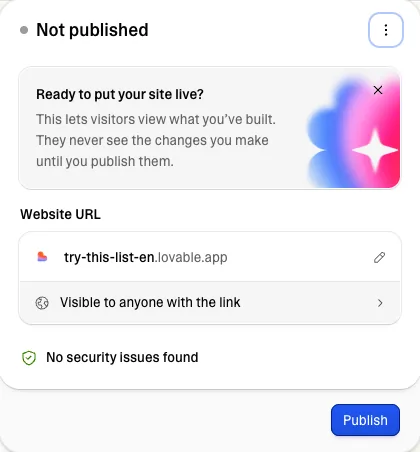
These are two real screens from the course.
You copy it, paste it into your own tool and watch what happens on your own screen. The examples run on Claude, ChatGPT and Lovable, with free accounts.
The dashboard, the published app and the six-step method leave the course with you and you reuse them at work the next day.
Stuck? Ask, in writing or out loud. It answers about the lesson you are on.
4 questions per lesson, 5 in the first, 5 in the second. At the end you get a course certificate, with the quizzes you passed.
You know what would make your work easier, but the request to IT comes back as a form to fill in, or it does not come back at all.
You ask questions and get answers, and you have noticed that making the same request by hand every time is the work you would like to remove.
A free account on Claude or ChatGPT, and one on Lovable from the fourth lesson on.
DigComp is the list Europe uses to name digital skills. There are 21 in all: this course covers 9. Below you find which ones, and in which lesson you learn them.
For several people, team licences cost less per person.
If after 10 minutes you have not learned something new, you have lost 10 minutes.
No. You describe what you want in your own language and the AI writes the code. In the sixth lesson you learn to read it and change something, but you never write it from scratch.
No. The examples run on the free accounts of Claude or ChatGPT and of Lovable. Paid plans only raise how much you can generate in a day.
The lessons take about two hours to read. If you build everything there is to build, allow three times that, spread out however you like.
It depends, and the last lesson has the checklist that decides. A few users and no sensitive data will hold; as soon as you touch real data or other systems, it goes to IT.

Max Turazzini. 3 years of workshops in more than 200 companies, 2,000 people trained. The course is built for good ideas that stay stuck waiting for someone to build them.
"You learn AI by doing it, by getting it wrong, and by having someone beside you who has been there before."
Start with the free lesson →